

Nintendo has rolled out a major firmware update for the Nintendo Switch family and the newly released Nintendo Switch 2, marking another milestone in the system's ongoing evolution.
Released on November 10, 2025, firmware version 21.0.0 brings a suite of new features, language support expansions, accessibility enhancements, and stability improvements to Nintendo’s flagship gaming hardware.
**Expanded Language Support and User Experience Improvements**
One of the most significant updates in version 21.0.0 is the inclusion of Thai and Polish as system language options.
This expansion allows a broader range of users to navigate and enjoy their Nintendo Switch consoles in their native tongues, increasing the accessibility and appeal of Nintendo’s ecosystem worldwide.
It’s important to note that while the system interface can now be set to Thai or Polish, individual game support for these languages depends on the software titles themselves.
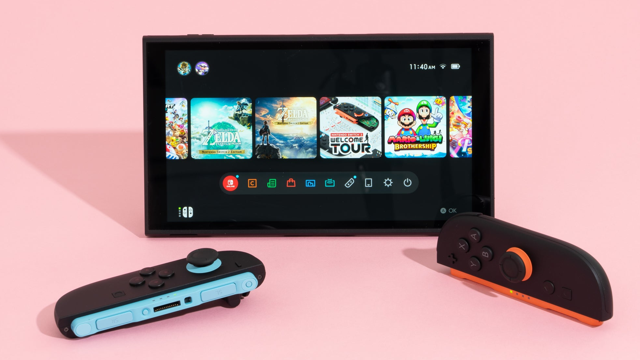
The update also introduces visual indicators above software icons on the HOME Menu to easily identify if a title is a physical cartridge or a digital download.
This clear at-a-glance information will simplify library management for users with both physical and digital collections.
**Enhanced Download and Notification Functions**
Nintendo has implemented functionality allowing users to download data for virtual game cards, even if the 'Use Online License' setting is disabled.
System transfer processes are now more customizable, letting users selectively disable options like album data transfer or software redownloading during setup on a new Nintendo Switch 2 console.
In a subtle yet meaningful change, the 'Platinum Point Notification Settings' menu has been renamed to 'Nintendo Switch Online Notification Settings,' reflecting the branding and services offered through Nintendo’s robust online ecosystem.
Additionally, when unboxing a bundled Nintendo Switch 2 console featuring included software, a new 'Receive Software' icon will display once the system is online.
This feature launches the Nintendo eShop, streamlining bundled software installation.
**GameChat, Accessibility, and Audio Enhancements**
Responding to user feedback, Nintendo has improved GameChat functionality.
Now, consoles won’t automatically enter sleep mode during active chats, and new settings for audio panning provide greater control.
GameChat sessions also continue seamlessly when transitioning between TV (docked) and handheld or table modes, regardless of changes in internet connectivity types.
Accessibility updates include improvements to the Text-to-Speech feature.
The maximum speed of synthesized speech now goes up to 400% of its base value—up from 300%—and predictive character conversion descriptions on the Japanese keyboard will be audibly read when the feature is enabled.
These changes address community requests for a more accessible gaming environment.
For audio, users can now select between 'Stable' and 'Low Latency' modes when using a Nintendo Switch 2 Pro Controller wirelessly.
The 'Low Latency' option can reduce sound delay, providing a more responsive experience for players—though with a possible trade-off in environments with significant wireless interference.
**Display, Transfer, and General System Stability**
Display settings have also been refined.
'HDR Output' is now clearly labeled as 'System Screen’s HDR Output,' and the Adjust HDR interface has received improvements for easier configuration.
Battery management language has become more precise, with charging options now specifying 80–90% charge thresholds.
As with all major updates, Nintendo includes general system stability enhancements to ensure a smoother user experience across all supported platforms: Nintendo Switch, Nintendo Switch Lite, Nintendo Switch OLED Model, and Nintendo Switch 2.
With version 21.0.0, Nintendo demonstrates an ongoing commitment to providing enhanced functionality, greater accessibility, and a streamlined gaming experience for its global user base.
The update is available now and can be downloaded via the system settings menu when connected to the internet.
For a complete rundown, visit the official Nintendo of America support page.
Released on November 10, 2025, firmware version 21.0.0 brings a suite of new features, language support expansions, accessibility enhancements, and stability improvements to Nintendo’s flagship gaming hardware.
**Expanded Language Support and User Experience Improvements**
One of the most significant updates in version 21.0.0 is the inclusion of Thai and Polish as system language options.
This expansion allows a broader range of users to navigate and enjoy their Nintendo Switch consoles in their native tongues, increasing the accessibility and appeal of Nintendo’s ecosystem worldwide.
It’s important to note that while the system interface can now be set to Thai or Polish, individual game support for these languages depends on the software titles themselves.
The update also introduces visual indicators above software icons on the HOME Menu to easily identify if a title is a physical cartridge or a digital download.
This clear at-a-glance information will simplify library management for users with both physical and digital collections.
**Enhanced Download and Notification Functions**
Nintendo has implemented functionality allowing users to download data for virtual game cards, even if the 'Use Online License' setting is disabled.
System transfer processes are now more customizable, letting users selectively disable options like album data transfer or software redownloading during setup on a new Nintendo Switch 2 console.
In a subtle yet meaningful change, the 'Platinum Point Notification Settings' menu has been renamed to 'Nintendo Switch Online Notification Settings,' reflecting the branding and services offered through Nintendo’s robust online ecosystem.
Additionally, when unboxing a bundled Nintendo Switch 2 console featuring included software, a new 'Receive Software' icon will display once the system is online.
This feature launches the Nintendo eShop, streamlining bundled software installation.
**GameChat, Accessibility, and Audio Enhancements**
Responding to user feedback, Nintendo has improved GameChat functionality.
Now, consoles won’t automatically enter sleep mode during active chats, and new settings for audio panning provide greater control.
GameChat sessions also continue seamlessly when transitioning between TV (docked) and handheld or table modes, regardless of changes in internet connectivity types.
Accessibility updates include improvements to the Text-to-Speech feature.
The maximum speed of synthesized speech now goes up to 400% of its base value—up from 300%—and predictive character conversion descriptions on the Japanese keyboard will be audibly read when the feature is enabled.
These changes address community requests for a more accessible gaming environment.
For audio, users can now select between 'Stable' and 'Low Latency' modes when using a Nintendo Switch 2 Pro Controller wirelessly.
The 'Low Latency' option can reduce sound delay, providing a more responsive experience for players—though with a possible trade-off in environments with significant wireless interference.
**Display, Transfer, and General System Stability**
Display settings have also been refined.
'HDR Output' is now clearly labeled as 'System Screen’s HDR Output,' and the Adjust HDR interface has received improvements for easier configuration.
Battery management language has become more precise, with charging options now specifying 80–90% charge thresholds.
As with all major updates, Nintendo includes general system stability enhancements to ensure a smoother user experience across all supported platforms: Nintendo Switch, Nintendo Switch Lite, Nintendo Switch OLED Model, and Nintendo Switch 2.
With version 21.0.0, Nintendo demonstrates an ongoing commitment to providing enhanced functionality, greater accessibility, and a streamlined gaming experience for its global user base.
The update is available now and can be downloaded via the system settings menu when connected to the internet.
For a complete rundown, visit the official Nintendo of America support page.